How to handle text overflow in CSS by truncating
17 February 2026 (Updated 17 February 2026)
Suppose you have a card element that needs to have a constrained width like 200px but it might contain a lot of text. In that case, you may want to display as much text as possible but truncate the text if it’s long so that you show an ellipsis (three dots) at the end like this:
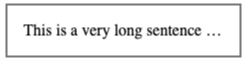
Here’s how you can do that:
<style>
  .card {
    border: 2px solid grey;
    padding: 16px;
    max-width: 200px;
    overflow-x: hidden;
    white-space: nowrap;
    text-overflow: ellipsis;
  }
</style>

<div class="card">
  This is a very long sentence which should be cut off.
</div>
See Codepen for demo.
Tagged:
CSS recipes